PUBG Mobile Lite Light Exclusive Graphics
Official screenshots show a LIGHT-only preference: less GPU load, more frame rate headroom.
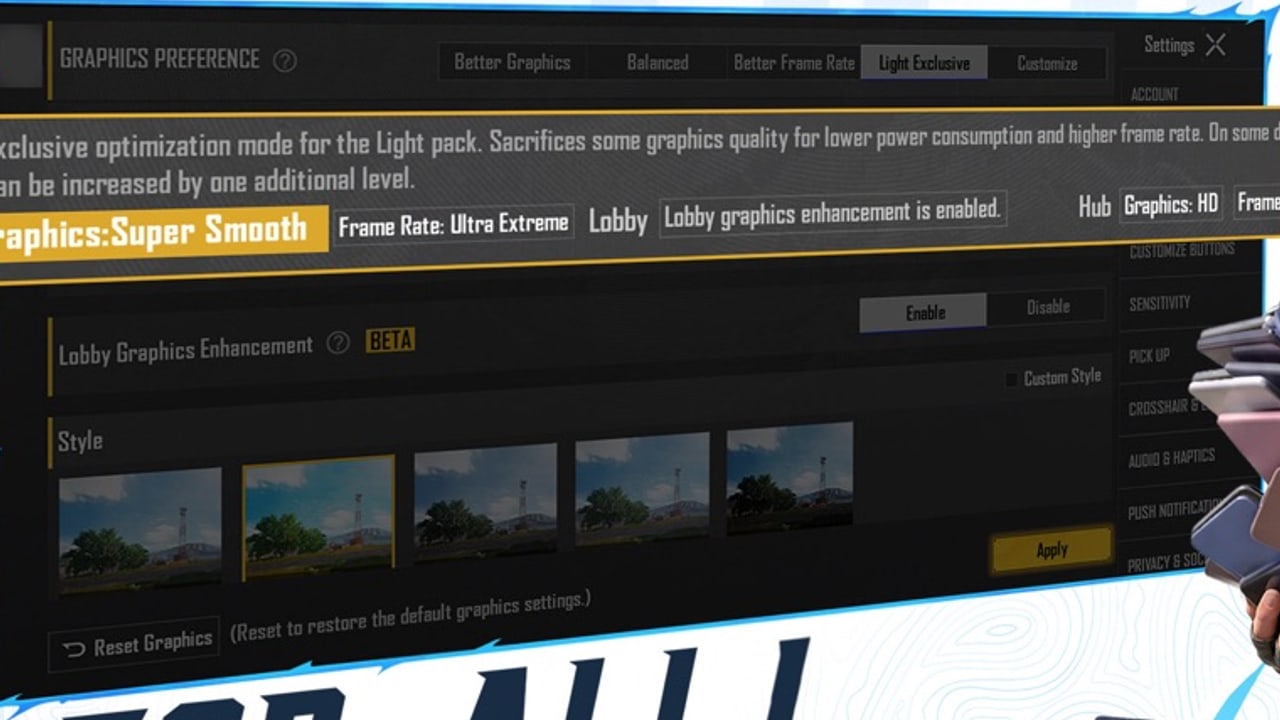
PUBG Mobile Lite is not a new gun. It is a new install budget. Official store art for PUBG MOBILE LIGHT shows a Graphics Preference panel with a Light Exclusive option sitting beside Better Graphics, Balanced, Better Frame Rate, and Customize. The helper text on that screenshot says Light Exclusive is an optimisation mode for the Light pack: it sacrifices some graphics quality for lower power consumption and higher frame rate, and on some devices an extra quality step can still be raised. Labels on the same art include Graphics: Super Smooth and Frame Rate: Ultra Extreme, plus a Lobby Graphics Enhancement toggle marked BETA.
That is the entire official graphics story this wiki will repeat. We will not invent a “best LIGHT 90 FPS code” for a Dimensity chip. We will not copy 2019 Lite RAM folklore onto this slider. Device requirements stays on published sizes (about 1 GB Android, under 2 GB iOS, iOS 13+) and refuses a fake RAM floor.
The client is still upcoming (November 2026 window; App Store listing currently 12 November 2026). Closed beta in selected countries is a work-in-progress build and not final, so a CBT screenshot of this menu can still move. Closed beta. Use this page as a plan for launch day, then retune in Training when you can actually queue.
What Light Exclusive is for
Full PUBG Mobile already asks phones to hold Erangel, effects, shadows, and a 100-player netcode. LIGHT’s pitch is a lighter first download and a lighter runtime. Light Exclusive is the runtime half: fewer GPU luxuries so more devices can hold a stable frame time. Super Smooth is the quality name that usually pairs with that idea in PUBG Mobile’s family of sliders. Ultra Extreme on the frame-rate row is an ambition, not a guarantee that every phone hits it.
If your squad is mixing LIGHT and the standard app — cross-play — the LIGHT player should pick stability over shadows. A 100-player classic fight on Erangel punishes frame-time spikes more than it rewards extra grass. How to play still expects you to peek, spray, and rotate. Controls and sensitivity only feel honest if the frame time is honest.
A launch-day order of operations
- Install from the official store. Download.
- Log in with the account you already use. Account and skins.
- Open Settings → Graphics. If Light Exclusive is present, turn it on for the first week.
- Set style to Super Smooth (or the lowest complete style that still shows enemies clearly).
- Raise frame rate only until the phone stays cool in a ten-minute Training drill. Do not start at Ultra Extreme on a warm handset.
- Leave Lobby Graphics Enhancement off until you finish a real classic match. A BETA lobby filter is not a chicken dinner.
- After one Erangel game, decide whether you need Better Frame Rate instead of Light Exclusive. Phones differ.
Do not download Miramar, Sanhok, TDM, and Metro Royale on the same night you are still hunting a stable frame time. Optional modules are the other half of the storage pitch. Modes, maps.
What this page will not claim
- A ranked FPS overlay. Macros and injectors get accounts banned.
- An official “90 FPS on Dimensity 6020” answer. That question showed up in Facebook comments under the LIGHT FAQ post. Official channels have not published a per-chip table.
- HDR, anti-aliasing, and shadow presets as LIGHT-only inventions. If the menu shows them, treat them like the main app: off until the fight is readable.
- A promise that Light Exclusive exists in every region’s CBT. Selected-country tests can hide flags.
How graphics ties to the rest of the wiki
Weapon families on Erangel do not change because you lowered shadows. The weapon tier list still ranks M416 and Beryl from shared gunplay. Landing spots still prefer compounds you can actually see. If trees smear, land somewhere with harder edges until you raise style one notch.
Squad roles should put the oldest phone on IGL-support, not on first-contact peek, until that phone proves it can hold ADS. Getting started is the install order. Preview is the product summary. Updates hub is the calendar.
When LIGHT is playable, come back and replace “screenshot language” with what your Training session actually did. Until then, the conservative loadout is Light Exclusive on, Super Smooth, frame rate only as high as the phone stays cool, extra maps later. Official listings: Google Play com.tencent.igfit, App Store 6740521489. Official site: pubgmobile.com. Index: tools hub.
Frequently Asked Questions
Quick answers before you drop into Erangel.
What is Light Exclusive in PUBG Mobile Lite?
Official store art shows a graphics preference that trades some quality for lower power use and higher frame rate. Details on this page.
Should I start on Ultra Extreme frame rate?
No. Raise frame rate only after a Training drill stays cool. Stability beats a peak FPS number.
Is there an official FPS table per chipset?
No. This wiki will not invent Dimensity or Snapdragon guarantees. Device requirements.
Does Light Exclusive change the gunplay?
It changes how the scene is drawn, not the weapon families. Weapons and how to play.
Can CBT graphics match launch?
Not necessarily. CBT is a work-in-progress build and not final. Closed beta.